
阿里巴巴Spring AI Alibaba:搭建支持RAG和工具调用的AI智能体,企业级AI应用开发新篇章!
SpringAIAlibaba是阿里巴巴基于SpringAI扩展的企业级AI开发框架,深度集成阿里云智能服务(如百炼平台),提供多智能体协作、大模型评估等企业级特性。核心功能包括Graph多智能体框架、阿里云AI生态集成等,适用于复杂AI应用开发。通过一个OA助手智能体示例,展示了从配置到部署的全流程,包括工具调用、向量存储和Graph编排。该框架填补了Java生态中企业级AI方案的空白,但当前版
一、认识Spring AI Alibaba

Spring AI Alibaba 是由阿里巴巴基于 Spring AI 生态扩展的企业级 AI 应用开发框架,深度集成阿里云智能服务(如百炼平台),专注于简化复杂 AI 应用的开发与生产落地
框架定义与核心定位
总体框架如下:
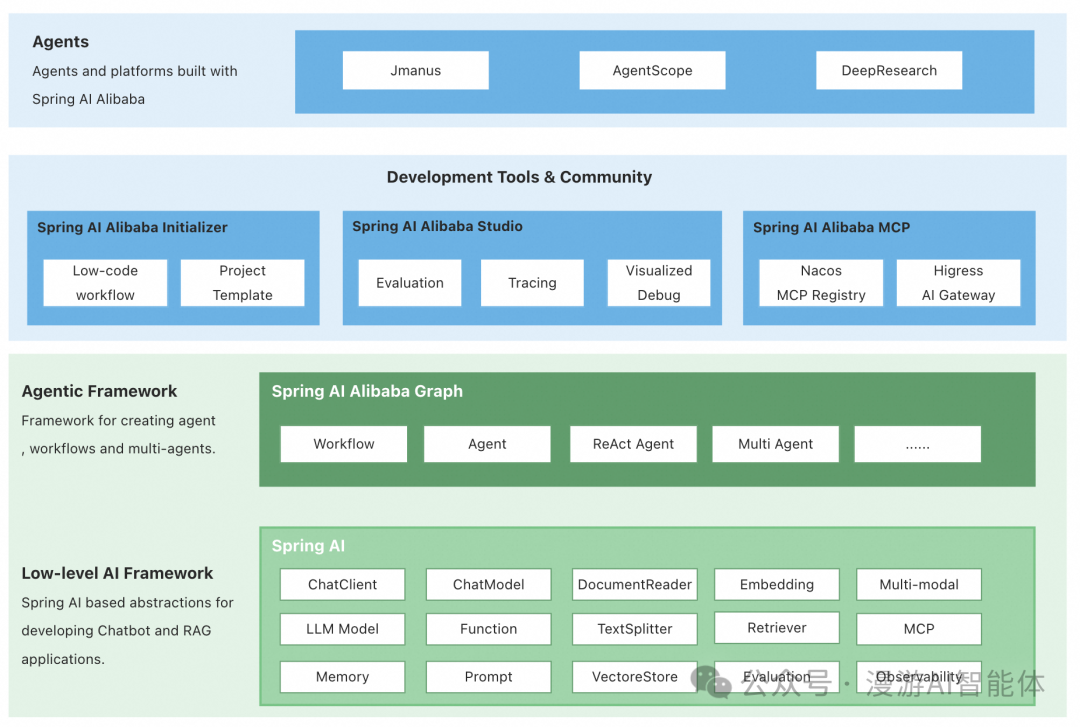
1、基础架构
Spring AI Alibaba 继承 Spring AI 的核心抽象(如 Prompt、Memory、RAG 等),提供统一的 AI API 层,支持模型无关的开发模式。
2、企业级扩展
聚焦解决企业场景痛点,如多智能体协作、大模型评估、可观测性等,填补 Java 生态中企业级 AI 解决方案的空白。
关键特性
1、Graph 多智能体框架
基于 Spring AI Alibaba Graph 开发者可快速构建工作流、多智能体应用,无需关心流程编排、上下文记忆管理等底层实现。通过 Graph 与低代码、自规划智能体结合,为开发者提供从低代码、高代码到零代码构建智能体的更灵活选择。
相当于基于Langchain的langGraph框架
2、深度集成阿里云AI生态
无缝对接百炼平台,支持通义千问(Qwen)、DeepSeek 等国产大模型,提供一站式模型接入与 RAG 知识库方案。
集成 Nacos(动态配置)、ARMS(全链路监控)、Langfuse(可观测性)等企业级组件
3、打造下一代通用智能体平台
基于 Spring AI Alibaba ,已经发布了 JManus、DeepResearch 两款产品,为开发者提供从低代码、高代码到零代码构建智能体的更灵活选择。
与 Spring AI 的核心区别
|
维度 |
Spring AI |
Spring AI Alibaba |
|---|---|---|
|
定位 |
提供 AI 原子能力(模型通信、RAG 基础) |
企业级智能体落地方案 |
|
核心能力 |
支持基础 ChatModel、Prompt 管理 |
扩展 Graph 多智能体框架、JManus 自主规划 |
|
生态集成 |
通用 Spring 生态 |
深度适配阿里云(百炼、ARMS、Nacos) |
|
企业特性 |
基础可观测性 |
强化分布式部署、MCP 服务治理、生产监控 |
|
适用场景 |
单智能体应用(如 ChatBot) |
工作流、多智能体协作、高可靠企业系统 |
二、使用Spring AI Alibaba搭建智能体
下面以一个简单的OA小助手智能体为例,介绍如何使用 Spring AI Alibaba 搭建智能体。
1、Maven依赖配置
 <!-- 引入spring-ai和spring ai alibaba 依赖管理 bom,统一管理相关依赖的版本,确保依赖一致性,避免版本冲突。-->
    <dependencyManagement>
        <dependencies>
            <dependency>
                <groupId>org.springframework.ai</groupId>
                <artifactId>spring-ai-bom</artifactId>
                <version>1.0.0</version>
                <type>pom</type>
                <scope>import</scope>
            </dependency>
            <dependency>
                <groupId>com.alibaba.cloud.ai</groupId>
                <artifactId>spring-ai-alibaba-bom</artifactId>
                <version>1.0.0.3-SNAPSHOT</version>
                <type>pom</type>
                <scope>import</scope>
            </dependency>
        </dependencies>
    </dependencyManagement>

<!-- 按需要引入依赖包-->
    <dependencies>
        <dependency>
            <groupId>org.springframework.boot</groupId>
            <artifactId>spring-boot-starter</artifactId>
        </dependency>
            <groupId>org.springframework.ai</groupId>
            <artifactId>spring-ai-starter-model-openai</artifactId>
        </dependency>
        <dependency>
            <groupId>org.springframework.ai</groupId>
            <artifactId>spring-ai-starter-model-deepseek</artifactId>
        </dependency>
        <dependency>
            <groupId>org.springframework.ai</groupId>
            <artifactId>spring-ai-advisors-vector-store</artifactId>
        </dependency>
        <dependency>
            <groupId>org.springframework.ai</groupId>
            <artifactId>spring-ai-starter-model-ollama</artifactId>
        </dependency>
        <dependency>
            <groupId>com.alibaba.cloud.ai</groupId>
            <artifactId>spring-ai-alibaba-graph-core</artifactId>
        </dependency>

        ···
2、application.yml配置
server:
  port:9090
spring:
application:
    name:ai-demo-java
# 配置大模型的key和参数
ai:
    deepseek:
      api-key:
      chat:
        options:
          model:deepseek-chat
    openai:
      api-key:
      base-url:
      chat:
        options:
          model:gpt-4o
    chat:
      observations:
        log-prompt:true
        log-completion:true
        include-error-logging:true
3、定义大模型客户端bean
@Configuration
public class ChatClientConfig {
    @Bean
    public ChatClient openAiChatClient(OpenAiChatModel chatModel) {
        return ChatClient.create(chatModel);
    }

    @Bean
    public ChatClient deepSeekChatClient(DeepSeekChatModel chatModel) {
        return ChatClient.create(chatModel);
    }
}
4、工具调用函数
工具的函数模拟定义了员工信息和员工部门信息的查询方法
@Slf4j
publicclassOaTools {

    @Tool(description = "Get user info")
    public String getUserInfo(String userName){
        return"User " + userName + " is a good guy";
    }

    @Tool(description = "Get user department")
    public String getUserDepartment(String userName){
        return"User " + userName + " is in department 1";
    }
}
5、向量存储配置
向量存储主要用来存储员工手册的资料向量,用于RAG检索。这里简单使用spring ai自带的内存向量存储SimpleVectorStore,嵌入模型使用在本地ollama部署的bge-m3模型,如果不定义嵌入模型,则自动使用阿里云百炼平台的向量模型
@Configuration
@Slf4j
publicclassVectorStoreConfig {


    // 初始化向量存储
    @Bean
    CommandLineRunner ingestTermOfServiceToVectorStore(
            VectorStore vectorStore,
            @Value("classpath:handbook.txt") Resource handbookDocs
    ) {

        return args -> {
            // Ingest the document into the vector store
            /*
             * 1、文档读取TextReader 读取 resources/handbook.txt 文件内容
             * 2、TokenTextSplitter 按token长度切分文本(避免大文本超出模型限制)
             * 3、向量化存储 通过 VectorStore.write() 将文本向量存入内存(后续可用于RAG检索)
             */

            log.info("Ingesting handbook.txt into vector store...");
            vectorStore.write(newTokenTextSplitter().transform(newTextReader(handbookDocs).read()));


            log.info("Done.");
            // 相似性搜索检测
            vectorStore.similaritySearch("工作时间").forEach(doc -> {
                log.info("Similar Document: {}", doc.getText());
            });
        };
    }

    // 这里简单使用自带的内存向量SimpleVectorStore,正常使用需要替换成真正的向量数据库,如Milvus等
    @Bean
    public VectorStore vectorStore(EmbeddingModel embeddingModel) {
        return SimpleVectorStore.builder(embeddingModel).build();
    }

    // 嵌入模型,这里使用本地自带的ollama部署的bge-m3模型
    // 如果没有显性定义,会自动使用Alibaba的嵌入模型
    @Bean
    public EmbeddingModel embeddingModel() {
        OllamaApiollamaApi=newOllamaApi.Builder().build();
        return OllamaEmbeddingModel.builder()
                .ollamaApi(ollamaApi)
                .defaultOptions(OllamaOptions.builder().model("bge-m3").build())
                .build();
    }
}
6、创建Graph
创建智能体的Graph,并注册到Spring容器中。用于编排智能体的工作流程。
spring ai alibaba提供了LlmNode方便定义大模型节点,这里使用LlmNode节点用于调用deepseek
使用toolCallbacks绑定了工具调用,会在调用大模型期间自动判断是否要调用工具
通过QuestionAnswerAdvisor向量数据库问答advisor,绑定了vectorStore, 会自动在调用大模型时,使用Rag检索增强大模型上下文
@Configuration
@Slf4j
publicclassOaAssistantGraph {

    //大模型客户端,这里使用DeepSeek
    @Qualifier("deepSeekChatClient")
    @Resource
    private ChatClient chatClient;

    //向量存储
    @Resource
    private VectorStore vectorStore;

    //系统提示词
    privatestaticStringSYS_PROMPT="""
            You are an assistant of a company's OA system, and your task is to help users query the administrative and personnel information within the company.
            You need to use tools to query relevant information from the database and knowledge base based on the user's questions and return it to the user.
            It is not allowed to forge the relevant regulations of the company at will to avoid misleading users out of thin air.
            You need to answer the users' questions and ensure the accuracy and completeness of the answers.
            You need to pay attention to the users' questions and avoid answering questions that they don't care about.
    """;

    @Bean
    public StateGraph oaGraph(ToolCallbackResolver toolCallbackResolver)throws GraphStateException {

        //定义大模型聊天过程中的上下文字段key
        KeyStrategyFactorykeyStrategyFactory= () -> {
            HashMap<String, KeyStrategy> keyStrategyHashMap = newHashMap<>();
            // 用户输入
            keyStrategyHashMap.put("user_input", newReplaceStrategy());
            // 会话id
            keyStrategyHashMap.put("thread_id", newReplaceStrategy());
            // 聊天记录
            keyStrategyHashMap.put("messages", newAppendStrategy());

            return keyStrategyHashMap;
        };

        // 工具列表
        ToolCallback[] oaTools = ToolCallbacks.from(newOaTools());

        // 大模型调用节点
        LlmNodellmNode= LlmNode.builder()
                .chatClient(chatClient)
                .systemPromptTemplate(SYS_PROMPT)
                .messagesKey("user_input")
                .stream(true)
                // 绑定工具调用
                .toolCallbacks(Arrays.asList(oaTools))
                .advisors(List.of(
                        // 大模型日志advisor
                        newSimpleLoggerAdvisor(),
                        // 向量数据库问答advisor
                        newQuestionAnswerAdvisor(vectorStore)))
                .build();

        // 状态图
        StateGraphstateGraph=newStateGraph(keyStrategyFactory)
                .addNode("invokeLLM", node_async(llmNode))
                .addEdge(StateGraph.START, "invokeLLM")
                // 添加工具调用路由,有工具调用后会进行大模型节点总结输出,否则结束
                .addConditionalEdges("invokeLLM", AsyncEdgeAction.edge_async((newLlmToolDispatcher())),
                        Map.of("continue", "invokeLLM", "end", StateGraph.END))
                ;

        // 添加 PlantUML 打印
        GraphRepresentationrepresentation= stateGraph.getGraph(GraphRepresentation.Type.PLANTUML,"OA flow");
        log.info("\n=== OA UML Flow ===");
        log.info(representation.content());
        log.info("==================================\n");

        return stateGraph;

    }
}
LlmToolDispatcher类实现大模型路由条件处理,主要是获取最后一条消息,判断是否包含工具调用,如果包含则继续路由回LlmNode总结输出,否则结束
@Slf4j
publicclassLlmToolDispatcherimplementsEdgeAction {

    @Override
    public String apply(OverAllState state)throws Exception {
        List<Message> messages = (List)state.value("messages").orElseThrow();
        AssistantMessagemessage= (AssistantMessage)messages.get(messages.size() - 1);
        log.debug("message.hasToolCalls(): {}", message.hasToolCalls());
        return message.hasToolCalls() ? "continue" : "end";
    }
}
7、聊天RestFul接口
创建一个restFul接口,用于接收用户输入,并调用智能体的Graph进行推理,返回结果。支持聊天流式输出。
@RestController()
@RequestMapping("/chat")
@Slf4j
publicclassChatController {

    privatefinal CompiledGraph compiledGraph;

    // 注入智能体Graph
    publicChatController(@Qualifier("oaGraph") StateGraph stateGraph)throws GraphStateException {
        SaverConfigsaverConfig= SaverConfig.builder().register(SaverConstant.MEMORY, newMemorySaver()).build();
        this.compiledGraph = stateGraph
                .compile(CompileConfig.builder().saverConfig(saverConfig).build());

    }

    // 聊天接口
    @GetMapping(value = "/stream", produces = MediaType.TEXT_EVENT_STREAM_VALUE)
    public Flux<ServerSentEvent<String>> stream(@RequestParam(value = "query", required = true) String query,
                                                @RequestParam(value = "thread_id", defaultValue = "t_001", required = false) String threadId)throws GraphRunnerException {
        RunnableConfigrunnableConfig= RunnableConfig.builder().threadId(threadId).build();
        Map<String, Object> objectMap = newHashMap<>();
        objectMap.put("user_input", List.of(newUserMessage(query)));

        GraphProcessgraphProcess=newGraphProcess();
        Sinks.Many<ServerSentEvent<String>> sink = Sinks.many().unicast().onBackpressureBuffer();
        //调用智能体Graph,并返回异步生成器
        AsyncGenerator<NodeOutput> resultFuture = compiledGraph.stream(objectMap, runnableConfig);
        //转换为SSE输出
        graphProcess.processStream(resultFuture, sink);

        return sink.asFlux()
                .doOnCancel(() -> log.info("Client disconnected from stream"))
                .doOnError(e -> log.error("Error occurred during streaming", e));
    }

}
GraphProcess 类作用将异步生成器转换成SSE输出处理:
public classGraphProcess {

    privatestaticfinalLoggerlogger= LoggerFactory.getLogger(GraphProcess.class);

    privatefinalExecutorServiceexecutor= Executors.newSingleThreadExecutor();

    publicvoidprocessStream(AsyncGenerator<NodeOutput> generator, Sinks.Many<ServerSentEvent<String>> sink) {
        executor.submit(() -> {
            generator.forEachAsync(output -> {
                try {
                    logger.info("output = {}", output);
                    StringnodeName= output.node();
                    String content;
                    if (output instanceof StreamingOutput streamingOutput) {
                        content = JSON.toJSONString(Map.of(nodeName, streamingOutput.chunk()));
                    } else {
                        JSONObjectnodeOutput=newJSONObject();
                        nodeOutput.put("data", output.state().data());
                        nodeOutput.put("node", nodeName);
                        content = JSON.toJSONString(nodeOutput);
                    }
                    sink.tryEmitNext(ServerSentEvent.builder(content).build());
                } catch (Exception e) {
                    thrownewCompletionException(e);
                }
            }).thenAccept(v -> {
                // 正常完成
                sink.tryEmitComplete();
            }).exceptionally(e -> {
                sink.tryEmitError(e);
                returnnull;
            });
        });
    }
}
8、启动项目测试
调用工具测试
http://localhost:9090/chat/stream?query=请查询员工jack的信息
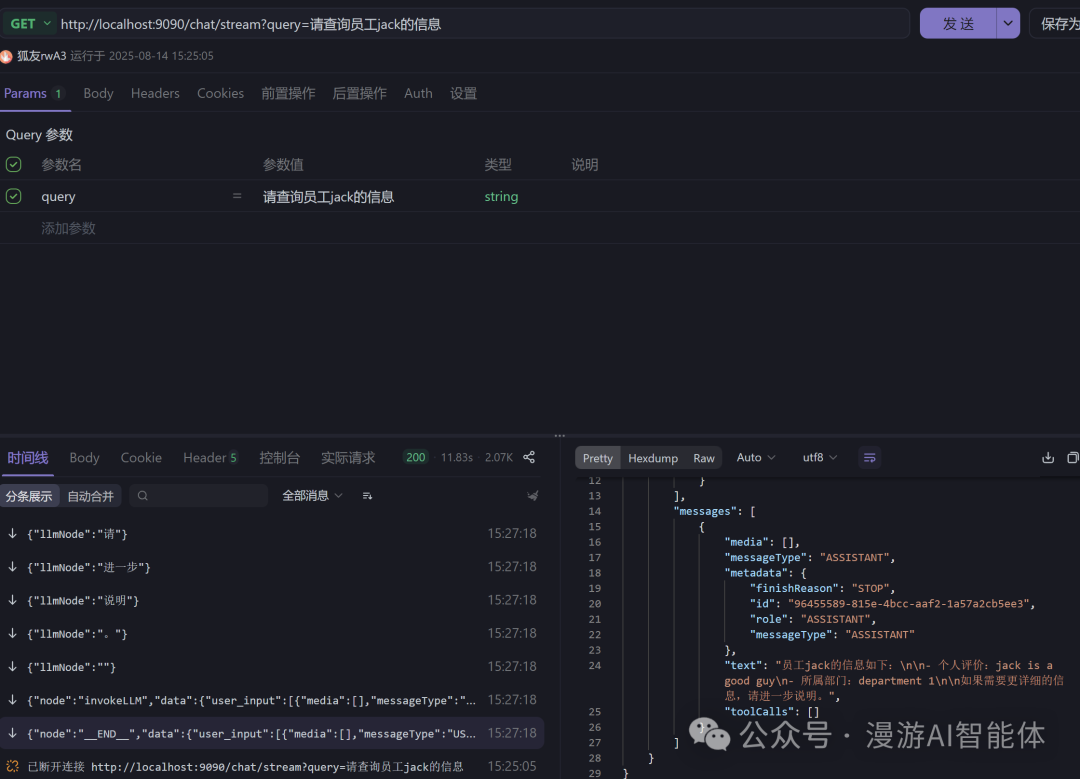
可以看到智能体Graph自动调用了工具方法查询员工信息,并以流式输出的方式返回结果。
RAG测试
http://localhost:9090/chat/stream?query=公司的年假有几天
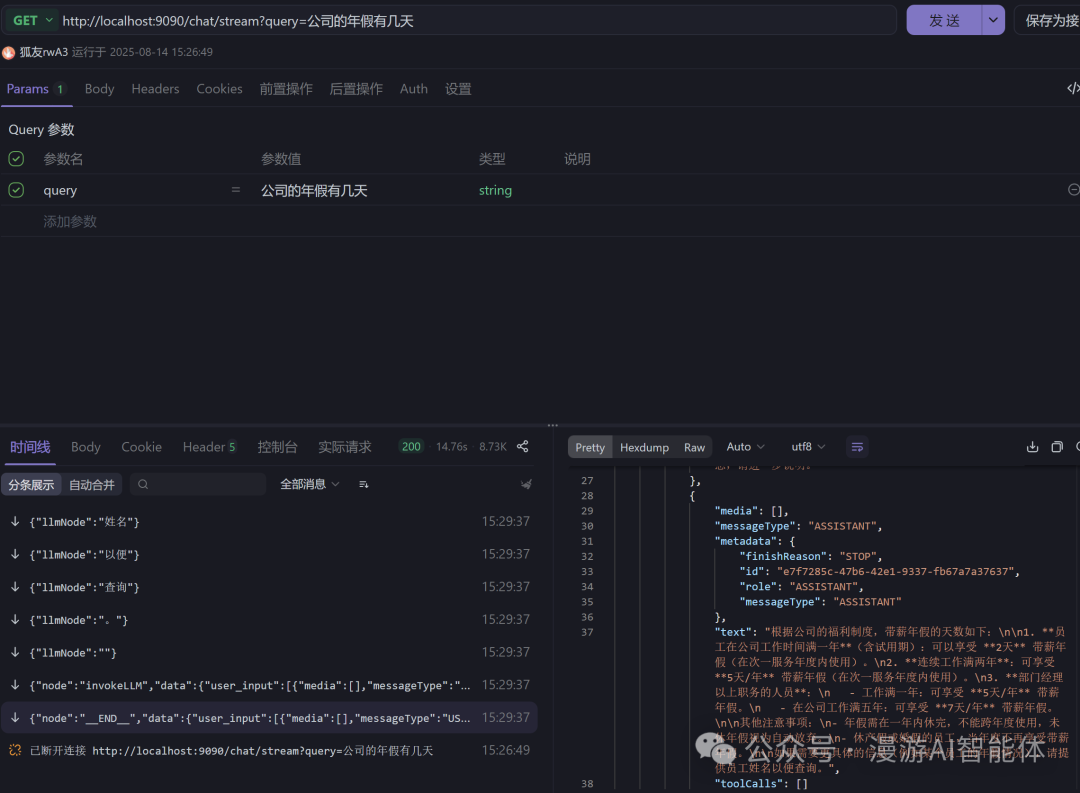
测试结果表明,智能体Graph自动调用了向量搜索了员工手册知识库,查询公司年假天数,并总结返回结果。
Spring AI Alibaba 是以 Spring AI 为基础,强化企业级多智能体协作与阿里云生态集成的生产级框架。其核心价值在于通过 Graph 编排、国产模型适配、企业工具链,解决复杂 AI 应用从开发到落地的全链路问题,尤其适合国内企业构建高可靠性智能系统。若项目依赖阿里云生态或需多智能体协同,Spring AI Alibaba 是更优选择;若仅需基础 AI 能力集成,Spring AI 更轻量。
但目前Spring AI 和 Spring AI Alibaba GA版本刚发布不久,体验后感觉还是很多Bug,特别是集成第三方工具,比如向量数据库过程中,还是会经常出现一些莫名其妙的问题,框架成熟度还需要不断进行提升。
三、如何学习AI大模型?
我在一线互联网企业工作十余年里,指导过不少同行后辈。帮助很多人得到了学习和成长。
我意识到有很多经验和知识值得分享给大家,也可以通过我们的能力和经验解答大家在人工智能学习中的很多困惑,所以在工作繁忙的情况下还是坚持各种整理和分享。但苦于知识传播途径有限,很多互联网行业朋友无法获得正确的资料得到学习提升,故此将并将重要的AI大模型资料包括AI大模型入门学习思维导图、精品AI大模型学习书籍手册、视频教程、实战学习等录播视频免费分享出来。
这份完整版的大模型 AI 学习和面试资料已经上传CSDN,朋友们如果需要可以微信扫描下方CSDN官方认证二维码免费领取【保证100%免费】

第一阶段: 从大模型系统设计入手,讲解大模型的主要方法;
第二阶段: 在通过大模型提示词工程从Prompts角度入手更好发挥模型的作用;
第三阶段: 大模型平台应用开发借助阿里云PAI平台构建电商领域虚拟试衣系统;
第四阶段: 大模型知识库应用开发以LangChain框架为例,构建物流行业咨询智能问答系统;
第五阶段: 大模型微调开发借助以大健康、新零售、新媒体领域构建适合当前领域大模型;
第六阶段: 以SD多模态大模型为主,搭建了文生图小程序案例;
第七阶段: 以大模型平台应用与开发为主,通过星火大模型,文心大模型等成熟大模型构建大模型行业应用。

👉学会后的收获:👈
• 基于大模型全栈工程实现(前端、后端、产品经理、设计、数据分析等),通过这门课可获得不同能力;
• 能够利用大模型解决相关实际项目需求: 大数据时代,越来越多的企业和机构需要处理海量数据,利用大模型技术可以更好地处理这些数据,提高数据分析和决策的准确性。因此,掌握大模型应用开发技能,可以让程序员更好地应对实际项目需求;
• 基于大模型和企业数据AI应用开发,实现大模型理论、掌握GPU算力、硬件、LangChain开发框架和项目实战技能, 学会Fine-tuning垂直训练大模型(数据准备、数据蒸馏、大模型部署)一站式掌握;
• 能够完成时下热门大模型垂直领域模型训练能力,提高程序员的编码能力: 大模型应用开发需要掌握机器学习算法、深度学习框架等技术,这些技术的掌握可以提高程序员的编码能力和分析能力,让程序员更加熟练地编写高质量的代码。

1.AI大模型学习路线图
2.100套AI大模型商业化落地方案
3.100集大模型视频教程
4.200本大模型PDF书籍
5.LLM面试题合集
6.AI产品经理资源合集
👉获取方式:
😝有需要的小伙伴,可以保存图片到wx扫描二v码免费领取【保证100%免费】🆓

更多推荐


 26
26 0
0- 0


 已为社区贡献18条内容

所有评论(0)