
Pytorch , AI 推理大模型的入门 an open source deep learning framework
https://pytorch.org/projects/pytorch/
PyTorch is an open source deep learning framework built to be flexible and modular for research, with the stability and support needed for production deployment.
PyTorch is an open source machine learning framework that accelerates the path from research prototyping to production deployment. Built to offer maximum flexibility and speed, PyTorch supports dynamic computation graphs, enabling researchers and developers to iterate quickly and intuitively. Its Pythonic design and deep integration with native Python tools make it an accessible and powerful platform for building and training deep learning models at scale.
PyTorch 是一个开源的机器学习框架,能够加速从研究原型到生产部署的进程。该框架以提供最大灵活性和速度为设计宗旨,支持动态计算图,使研究人员和开发者能够快速直观地进行迭代。其符合 Python 风格的设计以及与原生 Python 工具的深度集成,使其成为构建和训练大规模深度学习模型的易用且强大的平台。
Widely adopted across academia and industry, PyTorch has become the framework of choice for cutting-edge research and commercial AI applications. It supports a broad range of use cases—from natural language processing and computer vision to reinforcement learning and generative AI—through a robust ecosystem of libraries, tools, and integrations. PyTorch is also optimized for performance across CPUs, GPUs, and custom hardware accelerators, including support for distributed training and deployment on cloud platforms and mobile devices.
PyTorch 已在学术界和工业界被广泛采用,成为前沿研究和商业人工智能应用的首选框架。它通过强大的库、工具和集成生态系统,支持从自然语言处理、计算机视觉到强化学习和生成式人工智能的广泛用例。PyTorch 还针对 CPU、GPU 和定制硬件加速器进行了性能优化,包括支持分布式训练以及在云平台和移动设备上的部署。
Whether you’re advancing academic research or deploying AI solutions at enterprise scale, PyTorch delivers the speed, flexibility, and ecosystem support needed to transform ideas into impact.
Select your preferences and run the install command. Stable represents the most currently tested and supported version of PyTorch. This should be suitable for many users. Preview is available if you want the latest, not fully tested and supported, builds that are generated nightly. Please ensure that you have met the prerequisites below (e.g., numpy), depending on your package manager. You can also install previous versions of PyTorch. Note that LibTorch is only available for C++.
请选择您的偏好并运行安装命令。“稳定版”代表当前经过充分测试且受支持的PyTorch版本,适合大多数用户。若您需要包含最新功能但未经全面测试的每日构建版本,可选择“预览版”。请根据您使用的包管理器确保满足下列前提条件(如安装numpy等)。您也可以安装PyTorch的历史版本。请注意:LibTorch仅支持C++语言环境。
NOTE: Latest Stable PyTorch requires Python 3.9 or later. Latest Preview (Nightly) PyTorch requires Python 3.10 or later.
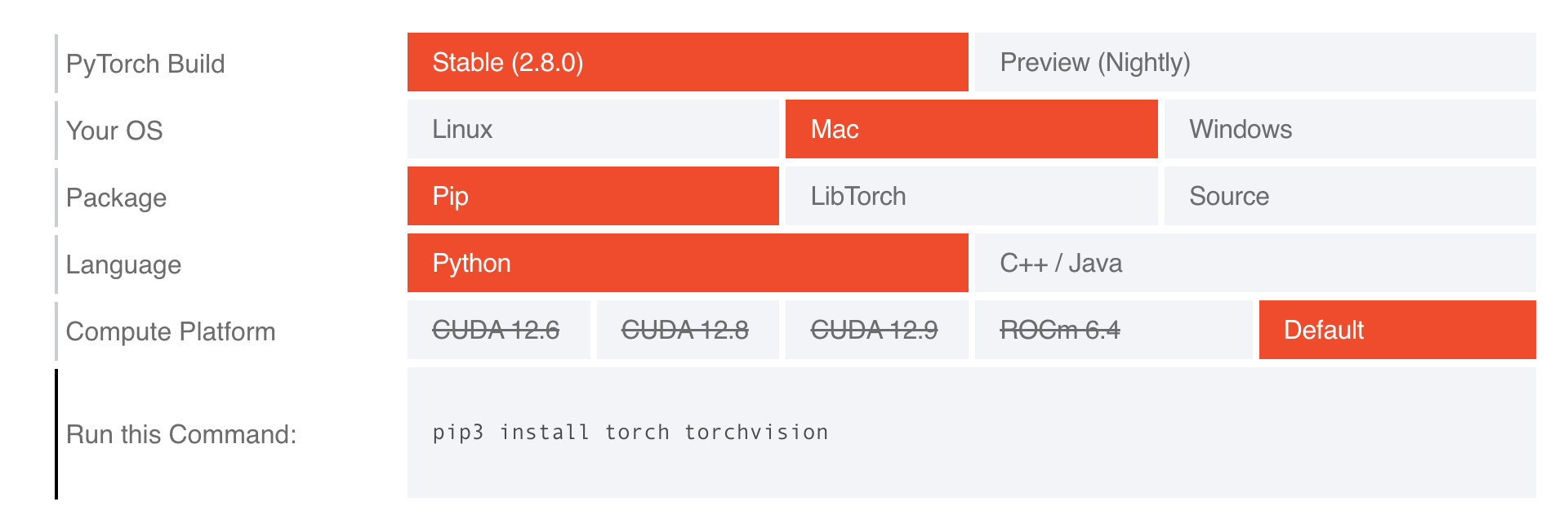
源码: https://github.com/pytorch/pytorch
pip3 install torch torchvision
安装 Pytorch 。
补充
>> pip3
Usage:
pip3 <command> [options]
Commands:
install Install packages.
lock Generate a lock file.
download Download packages.
uninstall Uninstall packages.
freeze Output installed packages in requirements format.
inspect Inspect the python environment.
list List installed packages.
show Show information about installed packages.
check Verify installed packages have compatible dependencies.
config Manage local and global configuration.
search Search PyPI for packages.
cache Inspect and manage pip's wheel cache.
index Inspect information available from package indexes.
wheel Build wheels from your requirements.
hash Compute hashes of package archives.
completion A helper command used for command completion.
debug Show information useful for debugging.
help Show help for commands.
General Options:
-h, --help Show help.
--debug Let unhandled exceptions propagate outside the main subroutine, instead of
logging them to stderr.
--isolated Run pip in an isolated mode, ignoring environment variables and user
configuration.
--require-virtualenv Allow pip to only run in a virtual environment; exit with an error otherwise.
--python <python> Run pip with the specified Python interpreter.
-v, --verbose Give more output. Option is additive, and can be used up to 3 times.
-V, --version Show version and exit.
-q, --quiet Give less output. Option is additive, and can be used up to 3 times
(corresponding to WARNING, ERROR, and CRITICAL logging levels).
--log <path> Path to a verbose appending log.
--no-input Disable prompting for input.
--keyring-provider <keyring_provider>
Enable the credential lookup via the keyring library if user input is allowed.
Specify which mechanism to use [auto, disabled, import, subprocess]. (default:
auto)
--proxy <proxy> Specify a proxy in the form scheme://[user:passwd@]proxy.server:port.
--retries <retries> Maximum attempts to establish a new HTTP connection. (default: 5)
--timeout <sec> Set the socket timeout (default 15 seconds).
--exists-action <action> Default action when a path already exists: (s)witch, (i)gnore, (w)ipe,
(b)ackup, (a)bort.
--trusted-host <hostname> Mark this host or host:port pair as trusted, even though it does not have valid
or any HTTPS.
--cert <path> Path to PEM-encoded CA certificate bundle. If provided, overrides the default.
See 'SSL Certificate Verification' in pip documentation for more information.
--client-cert <path> Path to SSL client certificate, a single file containing the private key and
the certificate in PEM format.
--cache-dir <dir> Store the cache data in <dir>.
--no-cache-dir Disable the cache.
--disable-pip-version-check
Don't periodically check PyPI to determine whether a new version of pip is
available for download. Implied with --no-index.
--no-color Suppress colored output.
--use-feature <feature> Enable new functionality, that may be backward incompatible.
--use-deprecated <feature> Enable deprecated functionality, that will be removed in the future.
--resume-retries <resume_retries>
更多推荐


 25
25 0
0- 0


 已为社区贡献2条内容

所有评论(0)